Getting my iPhone music app to keep playing on the lock screen

Cover: Headphones connected white smartphone black by Unknown, CC0 1.0.
I mostly use my private music app on an iPhone, added to the home screen, with the phone locked in my pocket. For a music app, two things are the bare minimum:
- When a track ends on the lock screen, the next one starts.
- The lock screen and Dynamic Island show previous and next buttons.
Both sound basic. In a home-screen web app on iOS, both took me far longer than I expected.
What I tried first
- A short silent clip between tracks. Before each switch I played a tiny silent sound, hoping iOS would think audio never stopped. The clip was so short it fired its own "ended" event, which sometimes skipped several tracks at once. Timers in the background were delayed too, so it worked only some of the time.
- Endless silent audio in the background. Keeping a silent loop playing all the time did make the lock screen move on to the next track. But I didn't know why it worked, and it broke again whenever I changed something else.
- Registering the buttons again after play started. This brought back previous and next on the Dynamic Island, but again I didn't know why.
When I rewrote the player, both problems came back. This time I wanted to understand the real cause instead of trying things until something stuck.
Why the next track never started
From WebKit bug reports and other developers' digging into WebKit's source, the picture is this:
- On recent iOS versions, when an audio element plays to its natural end and nothing else is playing, WebKit closes the app's audio session.
- In the foreground, the next
play()simply opens it again. - In the background, iOS won't let the app reopen it. The next track shows up on the lock screen, but paused, until you open the app.
- Pausing or seeking doesn't close the session. Only a natural end does.
That explains why the endless silent audio helped: something was always playing, so the session never closed. But there's a simpler way: make sure the music itself never "ends".
The fix: loop, and catch the jump back to the start
The audio element always has loop turned on. When a track reaches its end, the browser doesn't fire "ended"; it jumps back to 0:00. The player notices that jump, pauses, switches the source and plays the next track.
const audio = new Audio();
audio.loop = true; // never reaches a natural end

const isWrap = (from: number, to: number) =>
  playedPastStart && !recentManualSeek() &&
  from > 3 && to < 1.5 && from - to > 2;

audio.addEventListener('seeking', () => {
  if (isWrap(lastTime, audio.currentTime)) playNext();
});
A few things made it reliable:
- Seeks I make myself are marked, so dragging the progress bar back to the start isn't mistaken for the end of a track.
- Pause first, then change the source. Pausing doesn't close the session.
- Switch within the same event, not in a timer, because background timers get delayed.
- Download the next track early, while the current one plays, so the switch is instant with no gap.
- Tell iOS this is a music app by setting the audio session type to playback, where the browser supports it.
Why the buttons skipped 10 seconds
The second problem: I had registered previous and next, but the Dynamic Island showed buttons that skip 10 seconds back and forward instead.
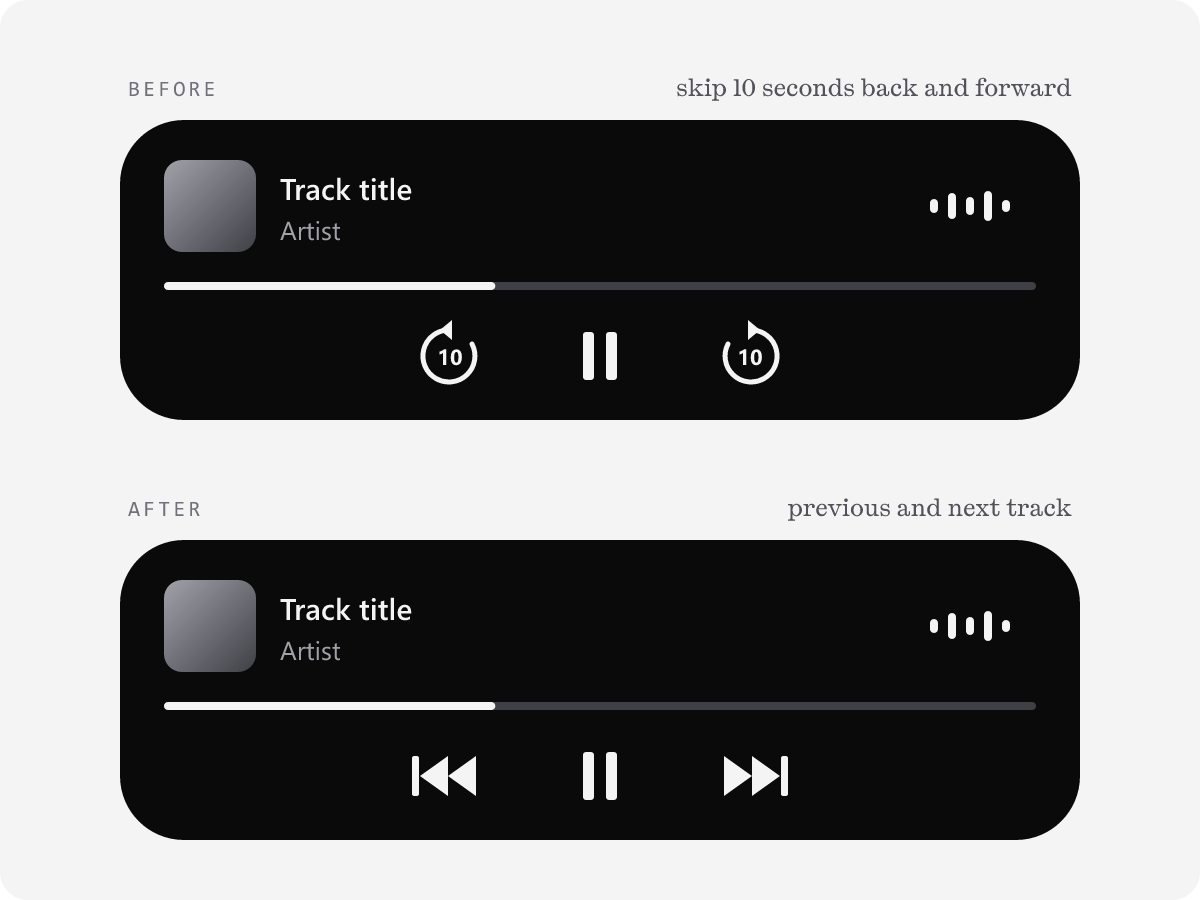
- iOS ignores Media Session handlers that are registered before the audio element becomes "Now Playing".
- Without valid previous and next handlers, it falls back to the 10-second skip buttons.
- My rewrite registered everything once when the app opened, before any sound. That's why the old "register again after play" trick had worked: the timing was right by accident.
The fix is to register the handlers again on every playing event, which costs almost nothing, and to clear the seek buttons explicitly:
audio.addEventListener('playing', () => {
  const ms = navigator.mediaSession;
  ms.setActionHandler('previoustrack', previous);
  ms.setActionHandler('nexttrack', next);
  // otherwise iOS adds ±10s and hides previous/next
  ms.setActionHandler('seekbackward', null);
  ms.setActionHandler('seekforward', null);
});
What changed
- On a locked iPhone, one track ends and the next one starts, every time.
- The lock screen and Dynamic Island show previous and next.
- I know why it works, so changing the player no longer breaks it.
A small testing tip: you don't have to wait for a whole song. Lock the phone and drag the progress bar to the last few seconds. Still, listen through at least once at the end, since that's closest to real use.
One caveat: what I described about WebKit comes from bug reports and other developers' analysis, not from Apple's documentation, so a future iOS version could change it.
Further reading
- WebKit bug 261858: a standalone PWA stops after one track
- WebKit bug 173332: background JavaScript and the ended event
- MusicHoarder #526: a natural end closes the audio session; loop as the fix
- MusicHoarder #507: playback audio session and switching tracks in the same event
- splitopen #15: handlers registered before Now Playing are ignored
- Miziki #42: clearing seekforward and seekbackward